
113 lines
4.8 KiB
Markdown
113 lines
4.8 KiB
Markdown
|
|
# GLAuth: LDAP authentication server for developers
|
|
[](https://glauth.github.io/)
|
|
[](https://github.com/fusion/kittendns)
|
|
[](https://github.com/fusion/wing-vpn)
|
|
|
|
Go-lang LDAP Authentication (GLAuth) is a secure, easy-to-use, LDAP server w/ configurable backends.
|
|
|
|

|
|

|
|

|
|
|
|
* Centrally manage accounts across your infrastructure
|
|
* Centrally manage SSH keys, Linux accounts, and passwords for cloud servers.
|
|
* Lightweight alternative to OpenLDAP and Active Directory for development, or a homelab.
|
|
* Store your user directory in a file, local or in S3; SQL database; or proxy to existing LDAP servers.
|
|
* Two Factor Authentication (transparent to applications)
|
|
* Multiple backends can be chained to inject features
|
|
|
|
Use it to centralize account management across your Linux servers, your OSX machines, and your support applications (Jenkins, Apache/Nginx, Graylog2, and many more!).
|
|
|
|
### Contributing
|
|
- Please base all Pull Requests on [dev](https://github.com/glauth/glauth/tree/dev), not master.
|
|
- Format your code automatically using `gofmt -d ./` before committing
|
|
|
|
### Quickstart
|
|
This quickstart is a great way to try out GLAuth in a non-production environment. *Be warned that you should take the extra steps to setup SSL (TLS) for production use!*
|
|
|
|
1. Download a precompiled binary from the [releases](https://github.com/glauth/glauth/releases) page.
|
|
2. Download the [example config file](https://github.com/glauth/glauth/blob/master/v2/sample-simple.cfg).
|
|
3. Start the GLAuth server, referencing the path to the desired config file with `-c`.
|
|
- `./glauth64 -c sample-simple.cfg`
|
|
4. Test with traditional LDAP tools
|
|
- For example: `ldapsearch -LLL -H ldap://localhost:3893 -D cn=serviceuser,ou=svcaccts,dc=glauth,dc=com -w mysecret -x -bdc=glauth,dc=com cn=hackers`
|
|
|
|
### Make Commands
|
|
|
|
Note - makefile uses git data to inject build-time variables. For best results, run in the context of the git repo.
|
|
|
|
### Documentation
|
|
|
|
<h4 align="center">:point_right: The latest version of GLauth's documentation is available at https://glauth.github.io/ :point_left:</h4>
|
|
|
|
<hr>
|
|
|
|
### Quickstart
|
|
|
|
Get started in three short [steps](https://glauth.github.io/docs/quickstart.html)
|
|
|
|
### Usage:
|
|
```
|
|
glauth: securely expose your LDAP for external auth
|
|
|
|
Usage:
|
|
glauth [options] -c <file|s3url>
|
|
glauth -h --help
|
|
glauth --version
|
|
|
|
Options:
|
|
-c, --config <file> Config file.
|
|
-K <aws_key_id> AWS Key ID.
|
|
-S <aws_secret_key> AWS Secret Key.
|
|
-r <aws_region> AWS Region [default: us-east-1].
|
|
--ldap <address> Listen address for the LDAP server.
|
|
--ldaps <address> Listen address for the LDAPS server.
|
|
--ldaps-cert <cert-file> Path to cert file for the LDAPS server.
|
|
--ldaps-key <key-file> Path to key file for the LDAPS server.
|
|
-h, --help Show this screen.
|
|
--version Show version.
|
|
```
|
|
|
|
### Configuration:
|
|
GLAuth can be deployed as a single server using only a local configuration file. This is great for testing, or for production if you use a tool like Puppet/Chef/Ansible:
|
|
```unix
|
|
glauth -c glauth.cfg
|
|
```
|
|
Here's a sample config wth hardcoded users and groups:
|
|
```toml
|
|
[backend]
|
|
datastore = "config"
|
|
baseDN = "dc=glauth,dc=com"
|
|
[[users]]
|
|
name = "hackers"
|
|
uidnumber = 5001
|
|
primarygroup = 5501
|
|
passsha256 = "6478579e37aff45f013e14eeb30b3cc56c72ccdc310123bcdf53e0333e3f416a" # dogood
|
|
sshkeys = [ "ssh-dss AAAAB3..." ]
|
|
[[users]]
|
|
name = "uberhackers"
|
|
uidnumber = 5006
|
|
primarygroup = 5501
|
|
passbcrypt = "243261243130244B62463462656F7265504F762E794F324957746D656541326B4B46596275674A79336A476845764B616D65446169784E41384F4432" # dogood
|
|
[[groups]]
|
|
name = "superheros"
|
|
gidnumber = 5501
|
|
```
|
|
|
|
More configuration options are documented [here](https://glauth.github.io/docs/file.html) and in this [sample file](https://github.com/glauth/glauth/blob/master/v2/sample-simple.cfg)
|
|
|
|
### Backends:
|
|
|
|
For advanced users, GLAuth supports pluggable backends. Currently, it can use a local file, S3 or an existing LDAP infrastructure. Through the use of optional plugins, you can connect SQL databases, PAM, and other datastores.
|
|
|
|
```toml
|
|
[backend]
|
|
datastore = "ldap"
|
|
servers = [ "ldaps://server1:636", "ldaps://server2:636" ]
|
|
```
|
|
|
|
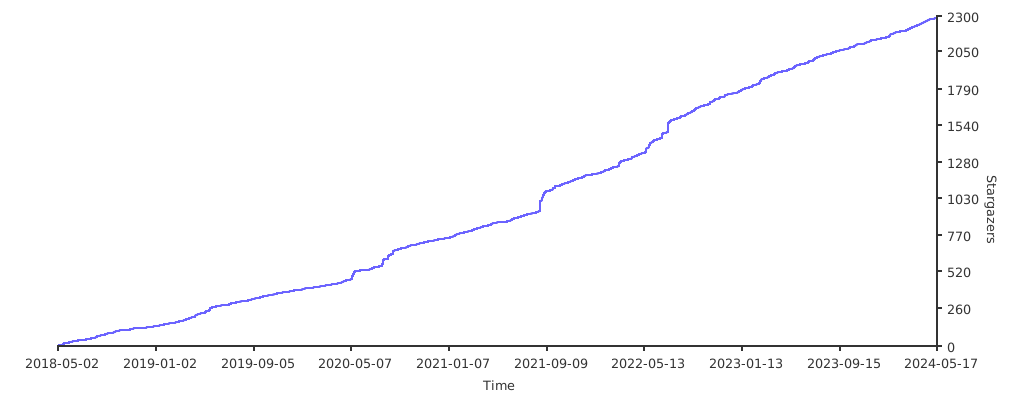
# Stargazers over time
|
|
|
|
[](https://starchart.cc/glauth/glauth)
|